Paper Planner or Calendar App? Choose by What You Need to See
Choose a paper planner or calendar app by the view, changes and reminders that suit your habits, so recurring commitments stay visible without adding noise.
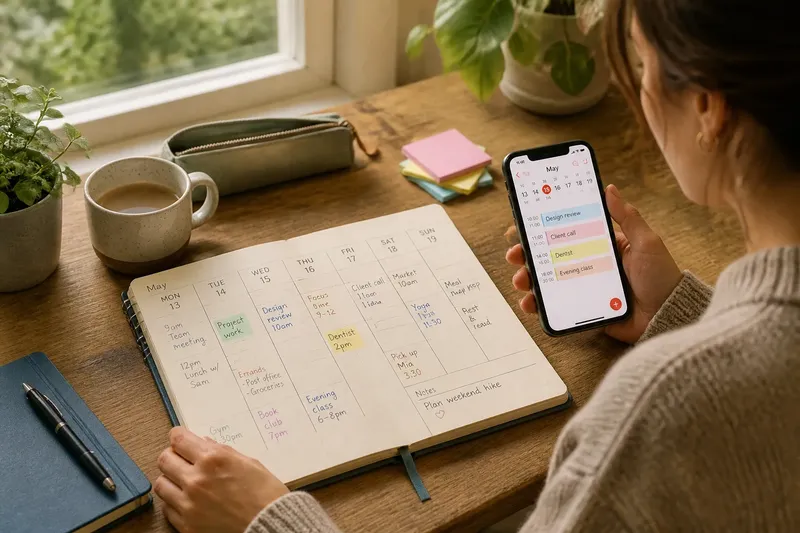
A paper planner makes the week visible at a glance; a calendar app can bring one commitment back to your attention at the right moment. Choosing between them is less about which is more modern and more about what you need to see, when you need to see it, and how often plans change.
Think of a calendar as a display for time, not a storage contest. The best choice is the one you naturally consult, can revise without friction and trust to make important commitments noticeable.
What do you need to see at a glance?
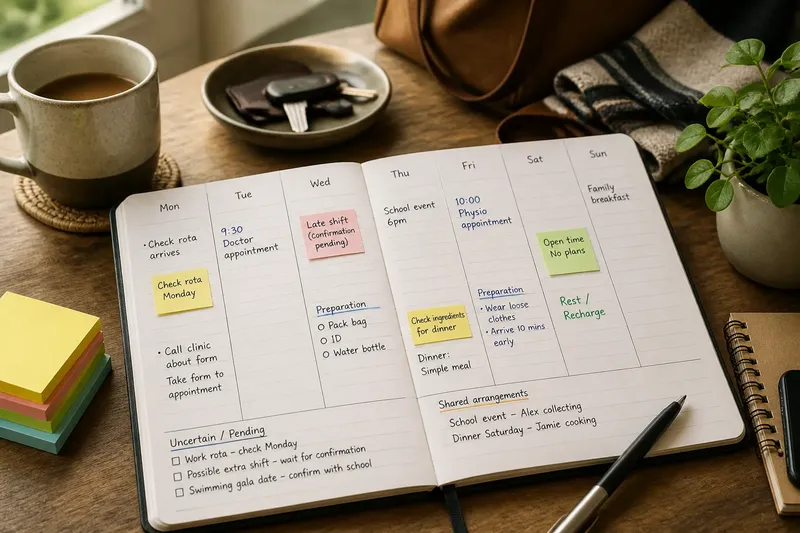
Paper offers a stable, physical view. A weekly spread can show work, appointments, errands and open space together, with handwritten notes sitting beside the dates that give them context. You can scan the whole page without unlocking a device or moving between screens.
That broad view suits people who orient themselves by seeing the shape of the week. It can also make visual crowding obvious: a page packed with ink looks different from a calendar that quietly hides competing events behind a tap.
A digital calendar is stronger when the useful view depends on the moment. You might check today’s appointments on a phone, then open a larger screen to see the coming week. Colour labels, separate calendars and search can help distinguish recurring commitments, personal plans and shared events—if those features make the display clearer rather than busier.
Choose the view you will actually consult during an ordinary day, not the one that looks most polished in a setup video.
How much does your schedule change?
Writing an appointment in a planner gives it a clear place, but changing it usually means crossing out, rewriting or shifting a note. Some people like the deliberate pause: moving a commitment becomes a visible decision instead of a silent update.
Apps make rescheduling easier when meetings move, plans arrive by message or several people need to coordinate. A changed event can be edited once and displayed on connected devices. That convenience is useful only if you know which calendar is authoritative and remember to make the change there.
Recurring commitments expose the difference. Paper gives you a fresh page to reconsider how a familiar week is unfolding; digital calendars can repeat an event without requiring you to write it again. If the commitment often changes, however, a recurring entry that no longer reflects reality can become background clutter.
Say you have a weekly evening class and occasional changes to its venue. With paper, you might write the regular class in the weekly spread and mark a changed location beside that date; the expected result is a clear, local note you see while scanning the page. In an app, you might keep the repeating class and edit only the affected event; the expected result is an updated entry visible wherever you check the calendar. Either method works if the update has one obvious home.
Which reminder will you notice without resenting?
A paper planner reminds through placement and routine. If it sits open on a desk or travels in a bag you use, its page can prompt a quick check. It cannot call out from another room, though, and a closed planner offers no nudge when your attention is elsewhere.
Calendar apps can use alerts, banners or sounds to draw attention to an event. These are useful for appointments that are easy to miss while working or travelling, but frequent notifications can train you to dismiss them automatically. A reminder that arrives at the wrong time may interrupt without helping.
Match the prompt to the event. A quiet visual alert may be enough for something you are already preparing for; a more noticeable reminder may suit a commitment that requires leaving home. Keep alerts selective so the important ones remain distinct from routine noise.
- Choose paper if seeing the whole week at once helps you remember what is coming.
- Choose an app if plans change often or need to appear across devices.
- Choose paper if writing an event helps you pause and take it in.
- Choose an app if a timely notification is more dependable than remembering to open a planner.
- Choose a simple setup if maintaining categories, colours and repeated entries starts to feel like another task.
Can you combine paper and digital without doubling the work?
Yes, if each has a distinct job. For instance, an app can hold appointments that need alerts or coordination, while a paper page can show the week’s overall shape. The risk is copying every event into both places and then having to reconcile two versions whenever plans change.
Set one calendar as the source of truth for fixed commitments. If that is the app, use paper for a selective view or handwritten notes rather than a second full schedule. If paper is authoritative, avoid treating an app’s incomplete entries as a reliable record.
For shared commitments, a digital calendar may be easier to keep in step with other people. For a private weekly overview, paper may feel calmer and more legible. There is no need to force both tools into equal roles.
Which calendar fits your planning habits?
Is a paper planner better for seeing the whole week?
It can be, especially if a two-page spread gives you enough room to see commitments and gaps together. Pick a layout you can read quickly; a cramped page or tiny handwriting defeats the advantage.
Is a calendar app better when plans change?
Often, because you can edit an event and view the change on connected devices. It suits a shifting schedule best when you have a clear habit of updating the calendar promptly.
Can I use both paper and a calendar app?
Yes, when one stores the authoritative schedule and the other offers a different view or a place for notes. Avoid maintaining two complete calendars that can drift apart.
What should I do if I keep forgetting to check my planner?
Change the cue before changing the whole system: keep paper where you naturally pause, or set a restrained app reminder for a useful time. If the calendar remains out of sight or the alerts are routinely dismissed, try the other format.
How can you make the choice without overthinking it?
Notice the failure you most want to prevent. Is it overlooking an event because you rarely open the planner, losing the week’s shape in a stream of notifications, or struggling to keep a changing schedule current? Let that answer determine which format gets the main role.
Then try the format with a normal week of commitments, not an imaginary ideal week. Add the recurring events you genuinely need to see, choose only the views and reminders that help, and notice whether checking the calendar feels natural or like a chore.
If you are still undecided, start with the tool that makes the next important commitment easiest to notice. A paper planner or calendar app should reduce the effort of remembering, not become another commitment to manage.
When choosing a paper planner or calendar app, make the decision specific to your attention: choose the view you can scan, the changes you can keep current and the reminder you will notice. Your calendar is doing its job when it brings the right commitment into view at the moment you can act on it.